Ten n8n workflows for marketing operations: lead routing, attribution, content ops, and sales handoff. Integration details and measurable outcomes included.
Quick Answer:
n8n is an open-source automation platform that connects marketing tools through pre-built integrations. Teams use it to automate lead scoring, content publishing, attribution reporting, competitor monitoring, email sequences, and sales handoff. Each workflow runs on a defined trigger, applies logic or AI processing, and routes outputs to CRM systems, Slack, or reporting tools without manual steps.
Marketing operations teams lose dozens of hours each week to repetitive coordination tasks. Email sends, post scheduling, lead routing and attribution reporting each take only minutes, yet together they consume a significant part of weekly capacity.
n8n is an open-source workflow automation platform with 400+ integrations and a library of 7,264+ pre-built templates. It connects tools such as HubSpot, Google Sheets, Slack, OpenAI, LinkedIn and Stripe, allowing processes to run automatically without building custom infrastructure.
The 10 workflows below reflect common operational scenarios for marketing teams in 2026. Each example explains how the tools are connected, what decisions happen inside the workflow and how teams reduce routine work.
n8n connects content planning, AI generation and publishing APIs into one coordinated workflow. A shared calendar becomes the control point for distribution across platforms, with approval and status tracking embedded into the same flow.
A scheduled trigger reads planned posts from Google Sheets and sends them to OpenAI’s GPT-4, which generates platform-specific versions in a single request. Posts are adapted for Twitter, LinkedIn and Instagram without manual reformatting.
DALL-E generates supporting visuals, which are stored in a connected asset repository such as Cloudinary before publishing. Before publishing, formatted previews are routed for approval. Once confirmed, posts are scheduled through Buffer. The spreadsheet updates with publishing status, previews and URLs to keep activity aligned.
This workflow connects Google Sheets for planning, OpenAI’s GPT-4 and DALL-E for content and asset generation, and Buffer for scheduled publishing. Each social platform connects through its API credentials, including LinkedIn OAuth2 and the Facebook Graph API. These integrations run content creation, approval and distribution inside one coordinated flow.
Teams managing shared content calendars and approval dependencies reduce coordination overhead. Agencies gain clearer publishing status tracking across client accounts.
A documented case study shows more than 20 hours per week recovered after moving scheduling and follow-up processes to n8n workflows. The workflow reduced coordination time and stabilized publishing cadence.
n8n scores and routes inbound leads immediately after submission. Qualification logic assigns priority based on defined criteria before records reach the CRM.
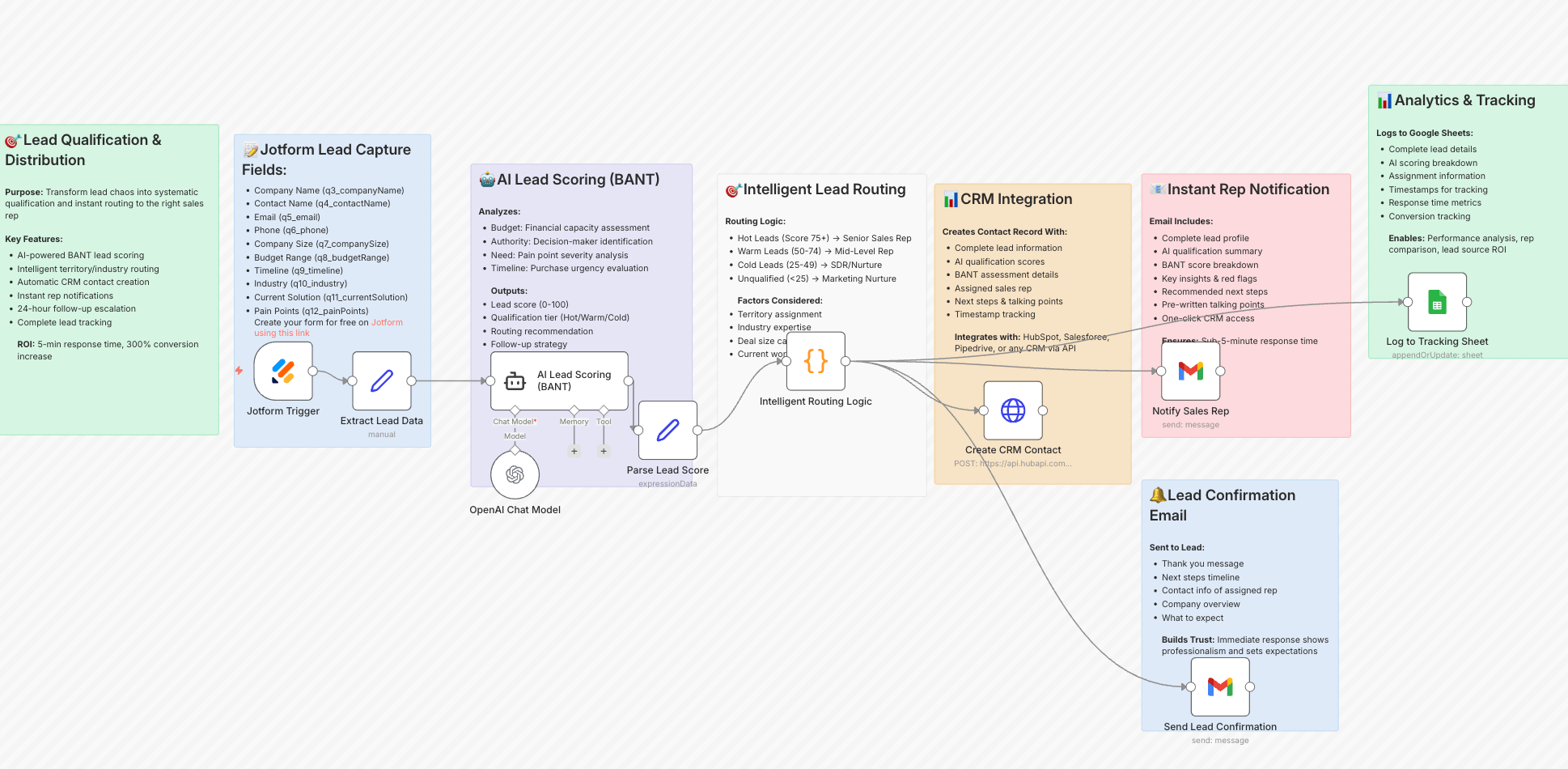
Inbound form submissions enter n8n through a webhook. The workflow applies BANT scoring using structured inputs such as budget, authority level, business need and timeline. Each prospect receives a score between 0 and 100, which determines routing logic.
High-score prospects are pushed directly into the CRM with predefined ownership rules and trigger instant notifications for the sales team. Mid-range scores enter a nurture sequence with AI-generated follow-up drafts prepared for review. Low-score submissions remain outside the active pipeline until additional signals are captured.
The workflow can also enrich records using website and company data to add context before scoring, improving assignment accuracy at the first routing stage.
This workflow connects Typeform or Jotform via webhook, OpenAI’s GPT-4 for scoring logic, email verification services such as Hunter or Abstract API, and CRM platforms including HubSpot, Salesforce or Pipedrive.
B2B SaaS companies, enterprise sales teams and professional services firms handling high inbound volume benefit from structured qualification and faster routing decisions.
A documented B2B SaaS case study shows response time reduced from more than 48 hours to minutes after implementing automated scoring in n8n. Routing accuracy improved and qualified prospects were assigned without manual review.
"Activities need to have a revenue outcome. Otherwise, you run out of money." — Steffen Hedebrandt, CMO & Co-founder, Dreamdata
n8n builds enriched email sequences by connecting lead sourcing, profile enrichment and AI drafting inside one coordinated workflow. Each message is generated from structured context rather than template variables.
Lead records enter n8n from sourcing tools and are enriched before drafting begins. Profile attributes such as role, company context and recent activity are parsed and stored in the CRM to create a unified prospect view.
The workflow then generates subject lines and email bodies using the enriched dataset. Messages reflect individual context, avoiding static template fields. Delivery timing, reply detection and follow-up sequencing are managed within the same workflow, ensuring outreach logic stays consistent.
This workflow connects sourcing platforms via API, profile enrichment services, OpenAI’s GPT-4 or Claude for content generation, CRM systems such as HubSpot or Salesforce, and email delivery tools including Smartlead or similar platforms. Optional verification services validate addresses before sending.
Sales development teams, agencies running outbound campaigns and companies executing account-based outreach benefit from structured enrichment and consistent sequencing logic.
Outbound preparation shifts from manual research and drafting to structured automated processing, increasing daily outreach capacity without additional headcount.
n8n monitors competitor websites and tracks pricing pages, feature updates and positioning changes automatically. The workflow compares current and previous versions and triggers alerts when pricing, feature sets or messaging change.The example below illustrates pricing monitoring logic implemented in n8n.
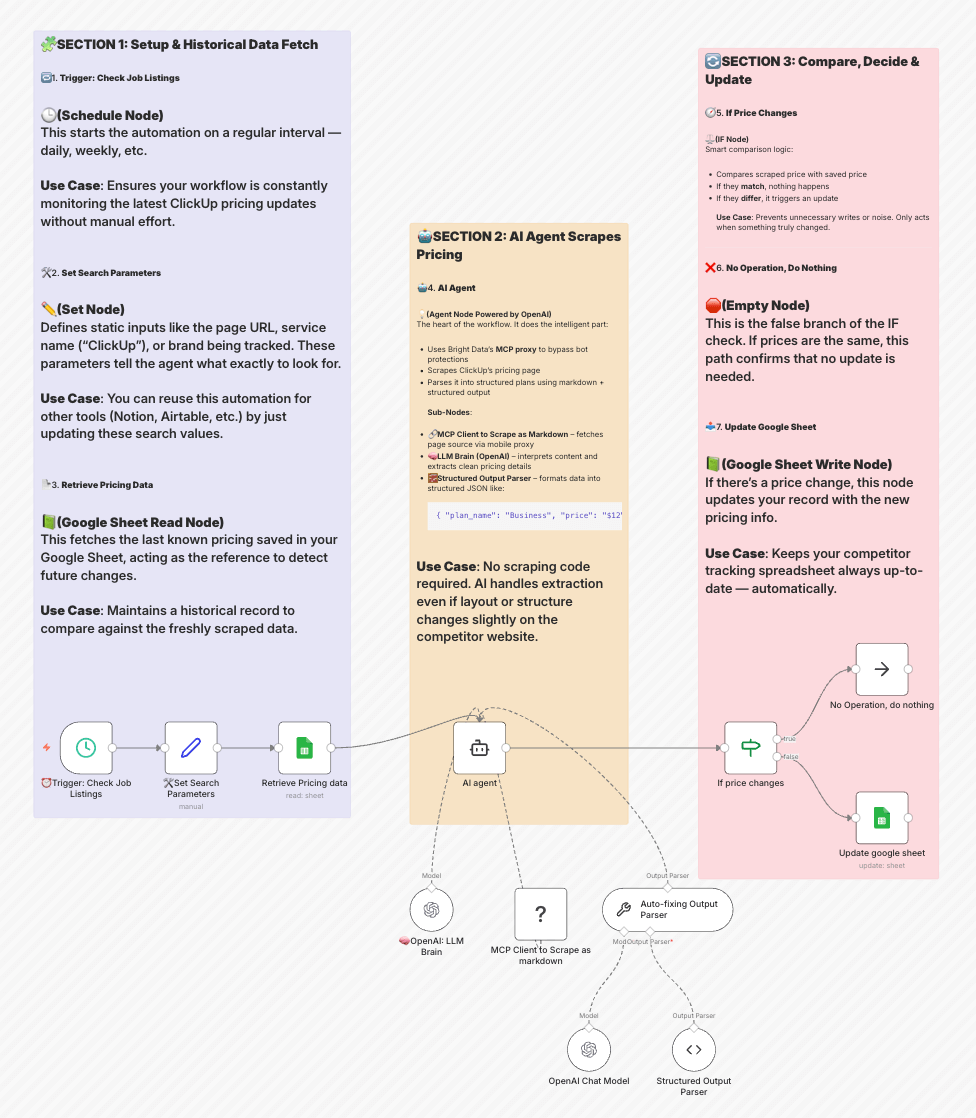
Website data is collected on a defined schedule through scraping or API access. Each new version is stored and compared with historical records to identify specific differences.
Detected updates are evaluated before notification. Pricing adjustments, new feature releases and messaging updates are flagged, while minor formatting edits are ignored. Structured records are stored for reference and trend tracking.
Web scraping tools or APIs connect external pages to n8n. OpenAI GPT-4o helps evaluate whether detected updates represent material changes. Google Sheets or PostgreSQL store structured records. Slack or similar tools deliver notifications.
Product teams tracking competitor releases, sales teams monitoring pricing shifts and marketing teams reviewing positioning benefit from automated change detection. Business intelligence teams gain structured historical records without maintaining manual tracking files.
Manual site checks are replaced with event-based monitoring. Material updates surface automatically, allowing teams to react without maintaining separate tracking spreadsheets.
n8n collects reviews from multiple platforms, analyzes them and routes feedback automatically. Reviews are analyzed, categorized and assigned without manual checks.
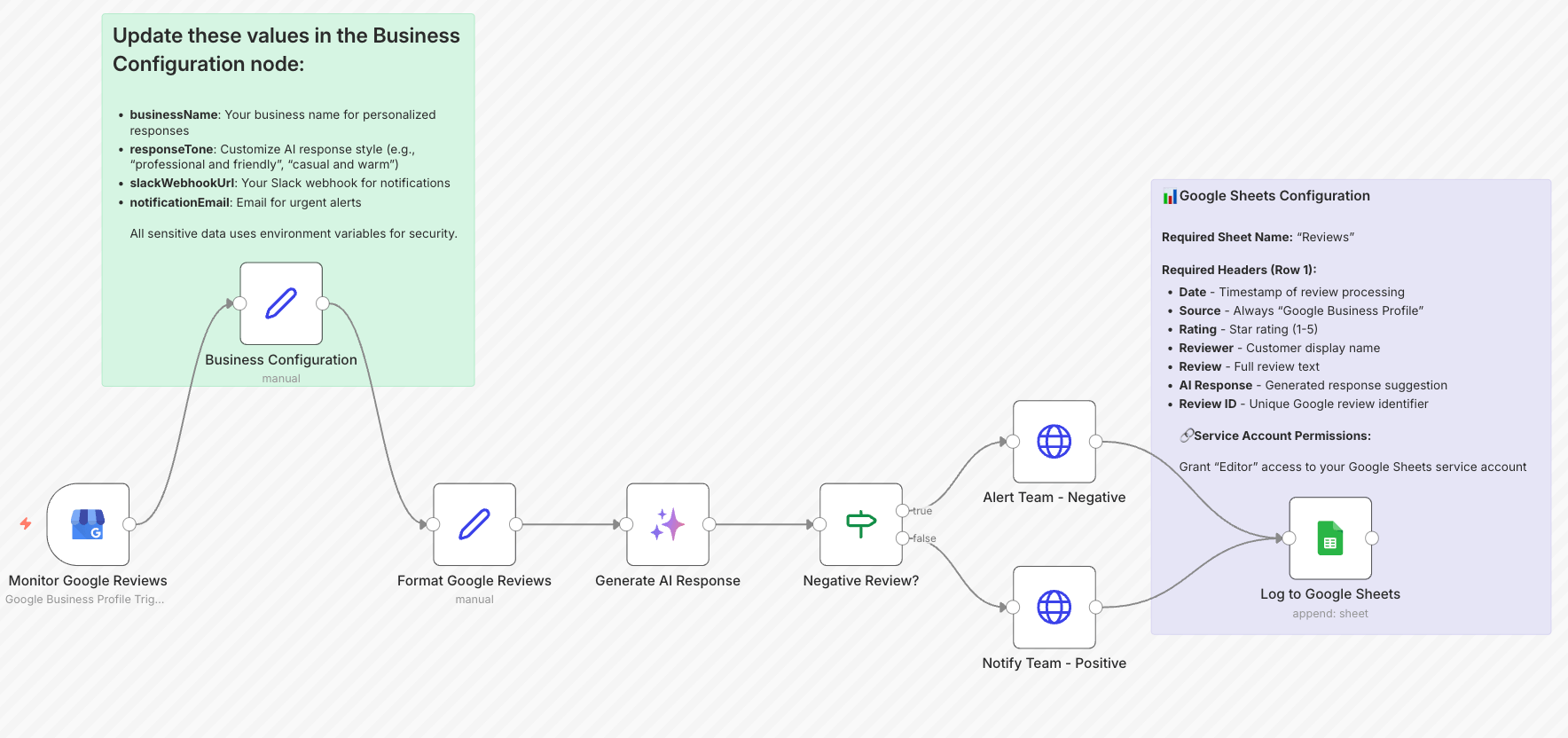
The workflow retrieves product URLs or account references and checks platforms such as Google Business Profile, Trustpilot and Google Play on a defined schedule.
Each review is analyzed, scored and tagged before routing. Negative reviews trigger immediate Slack or email alerts with full context. Positive reviews can be formatted for reuse on websites. All entries are logged with timestamps and sentiment data.
Google Business Profile API, Trustpilot data integration, Google Play Console API, OpenAI GPT-4o or Google Gemini for analysis, and Slack or email routing tools.
E-commerce businesses managing multiple listings, local companies monitoring reputation and app developers tracking store feedback benefit from centralized monitoring and automated routing.
Manual review checks are removed from daily operations and response time improves once alerts are automated. Feedback becomes structured and traceable instead of platform-dependent.
n8n centralizes routing, formatting and distribution across channels inside one operational workflow. Assets are transformed, scheduled and tracked without manual coordination between tools.
The workflow pulls content from WordPress or RSS feeds and transforms it into channel-specific formats. A single source asset becomes LinkedIn posts, newsletter summaries, short social updates or blog excerpts, each adapted for its destination.
Distribution runs on schedule and outputs are logged for tracking. The team sees what is published, pending or under review from one control layer.
For video content, YouTube URLs are retrieved and transcripts extracted before AI generates derivative formats. Engagement signals collected after publishing can trigger follow-up workflows or reporting updates.
WordPress or RSS feeds for content input, OpenAI GPT-4 or Gemini for content transformation, transcription APIs for video, publishing tools such as Buffer or SocialBu for distribution, and Airtable for tracking and status management.
Agencies managing multiple client accounts and teams maintaining cross-channel consistency benefit from centralized orchestration. It is effective when content volume makes manual coordination inefficient.
Publishing logic runs from a single source, reducing channel drift and eliminating the need for parallel coordination across tools.
n8n connects lead sources, deals and revenue data inside one workflow. Closed revenue is matched back to original acquisition channels automatically.
The workflow retrieves closed deals on a defined schedule and matches each deal to its originating lead source. Revenue per source, cost per lead, conversion rate and return on investment are calculated and stored.
A separate process aggregates UTM-based leads by channel and aligns advertising spend with revenue outcomes. Reporting outputs are generated automatically and delivered to stakeholders without manual consolidation.
CRM systems for deal data, Google Sheets or Airtable for lead tracking, advertising platform APIs for spend data, OpenAI GPT-4o for report generation, and Slack or email for distribution.
Marketing teams running multi-channel campaigns and agencies building client attribution reports benefit from centralized revenue mapping. It is relevant when manual spreadsheet reconciliation becomes unreliable.
Channel-level revenue reporting replaces manual spreadsheet reconciliation. Performance metrics update automatically, enabling faster budget decisions.
"Attribution is an input, not the gospel truth." — Kyle Lacy, CMO at Docebo
A/B tests generate page-level conversion data. n8n collects, evaluates and routes those results into structured recommendations automatically.
The workflow retrieves page views and conversions from Google Analytics on a defined schedule. Conversion rates are calculated and logged per variant.
When thresholds are met, automated analysis evaluates UX structure, messaging clarity, technical performance and conversion flow. Recommendations are stored and shared without manual spreadsheet work.
Test results append to Google Sheets. Slack notifications trigger when a variant outperforms the baseline.
Google Analytics for performance data, Google Sheets for logging, OpenAI models for structured analysis, and Slack for notifications.
E-commerce teams optimizing product pages, SaaS companies testing signup flows and agencies managing multiple landing pages benefit from automated evaluation and faster decision cycles.
Variant performance is calculated automatically and stored in a structured format. Optimization decisions are based on logged conversion data instead of manual comparison across tools.
A qualified lead in the CRM is only valuable if the assigned rep has full context. n8n structures the handoff automatically once a lead reaches the defined qualification threshold.
When a lead meets scoring criteria, the workflow retrieves its full record, including UTM parameters, form responses, page activity, email engagement and qualification score. This data is compiled into a structured brief before assignment.
The brief is routed to the responsible rep via Slack and a follow-up task is created in HubSpot or Salesforce with a defined due date.
If no action is taken within a configured window, an escalation notification is sent to the sales manager. Each handoff is logged with timestamp, assigned rep and status.
For account-based campaigns, the workflow can append recent company updates or relevant talking points so the first outreach is informed by current context.
CRM platforms such as HubSpot or Salesforce for triggers and task creation, Slack for routing and escalation alerts, Google Sheets or Airtable for logging, and optional enrichment services for company-level context. OpenAI models generate the structured brief.
B2B teams with defined sales cycles and shared ownership of inbound leads benefit most. It is relevant when marketing and sales operate in separate systems and handoff quality varies by rep.
The time between lead qualification and first contact is reduced. Sales receives structured context instead of raw lead data. Lead-to-opportunity tracking becomes consistent because every handoff is logged and timestamped.
Marketing data often lives across advertising platforms, CRM systems, finance tools and social channels. n8n centralizes these inputs into one structured reporting workflow.
Scheduled workflows retrieve performance data from advertising platforms, CRM systems and analytics tools on a defined interval. Metrics such as spend, conversions, revenue and campaign performance are normalized and stored in a central data layer.
Incoming signals such as social mentions or campaign alerts can be categorized automatically and appended to the same reporting structure.
The dashboard reflects updated metrics without manual data exports or spreadsheet reconciliation.
Advertising platform APIs for campaign performance, CRM systems for pipeline data, Google Sheets or databases for structured storage, and OpenAI models for categorization or summary generation. Dashboard visualization tools consume the normalized dataset.
Marketing leaders managing multi-channel performance, operations teams responsible for reporting accuracy and product teams tracking growth signals benefit from centralized data aggregation.
Reporting cycles move from manual data consolidation to automated updates. Dashboards remain current between reporting periods, and teams make decisions based on synchronized data instead of fragmented exports.

Still copying data between tools? There's a workflow for that and Darwin can build it.

If you have never set up an n8n workflow before, this beginner tutorial walks you through installation, setup, and first use in one walkthrough.
The workflows described above automate individual processes: lead routing, attribution, reporting, content distribution and sales handoff. As these systems grow, coordination becomes more complex than execution.
Automation at scale requires structured control over how workflows interact, how AI outputs are routed, and how performance is monitored across teams.
Darwin operates at this layer.
Darwin enables automation systems to operate as coordinated infrastructure rather than disconnected task automation.
Ready to stop configuring workflows and start running them? Darwin builds the automation layer your marketing operations need.
Q1. What are the main benefits of using n8n for marketing automation?
n8n centralizes integrations, automates repetitive tasks and connects AI models with operational workflows. Teams reduce manual coordination and gain structured control over marketing processes.
Q2. How much time can marketing teams save with n8n workflows?
Time savings depend on the use case. Lead routing, reporting and social publishing automation can eliminate hours of manual coordination each week.
Q3.Do I need coding skills to set up n8n marketing workflows?
Most workflows can be built using the visual editor. Basic API understanding helps, but advanced coding is not required for standard marketing automation.
Q4. What is the typical cost of running AI-powered workflows in n8n?
Costs are usage-based and tied to API calls. AI generation and analysis incur model fees, while many integrations run on low or free tiers.
Q5. Which workflow should marketing teams implement first?
Start with the process that consumes the most manual time, such as lead qualification, reporting consolidation or multi-channel publishing.
Contact Darwin today for a custom SEO strategy that combines the best automation tools with proven tactics to dominate Google and AI search results.
Talk to us